Register for Bangladesh Railway E-Tickets Booking


 May 31, 2026 10:27 am
Register for Bangladesh Railway e-tickets using your National ID (NID) to unlock seamless online train booking across all intercity routes. The Bangladesh Railway E-Ticketing Service now requires mandatory NID verification through SMS before you can create your account and book tickets.
In this authoritative guide, you’ll learn the exact registration method used on the official portal from entering your NID details to SMS verification plus critical tips for minors and foreign passport holders who need alternative registration paths.
Important: You must complete registration on the official Bangladesh Railway E-Ticket website: https://eticket.railway.gov.bd. This blog provides step-by-step guidance only.
Why Register with NID Verification?
Register with your National ID to access Bangladesh Railway’s secure e-ticketing ecosystem. The NID-linked system, implemented by the Bangladesh government, prevents scalping, ensures passenger identity accuracy, and enables faster ticket checks during travel.
Key Benefits:
- Fraud prevention: NID verification eliminates duplicate accounts and black-market ticket sales
- Faster boarding: Ticket checkers scan your NID-matched booking instantly
- SMS confirmation: Real-time verification ensures your mobile number is active and valid
- Digital record: All bookings link to your national identity for easy tracking
- Official compliance: Meets Bangladesh Railway’s security protocols under the Ministry of Railways
Registration Requirements: What You Need
Before you register, prepare these exact items:Table
| Requirement | Format Example | Critical Notes |
|---|---|---|
| Full Name | Exactly as printed on NID card | Mismatches cause booking rejection |
| Mobile Number | 017XXXXXXXX (Bangladeshi SIM) | Must receive SMS OTPs |
| NID Number | 10-digit Smart NID or 17-digit legacy NID | No spaces or dashes |
| Date of Birth | DD-MM-YYYY format | Must match NID database exactly |
Pro Tip: If your NID was recently issued, allow 7-14 days for the database to update before registering.
How to Register on Bangladesh Railway E-Ticket?
Follow these 5 proven steps to register using the actual portal method:
Step 1: Visit the Official Website
Go to https://eticket.railway.gov.bd. Verify the URL shows the government domain .gov.bd and a secure padlock icon.
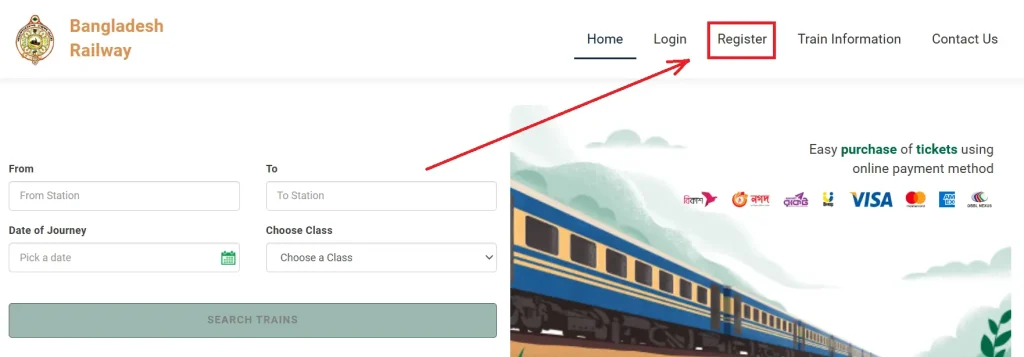
Step 2: Access the Registration Page
Click “Sign Up” or “Register” on the homepage. The system displays the NID verification form.
Step 3: Enter Your NID Information
Complete all fields exactly as shown on your Smart NID card:
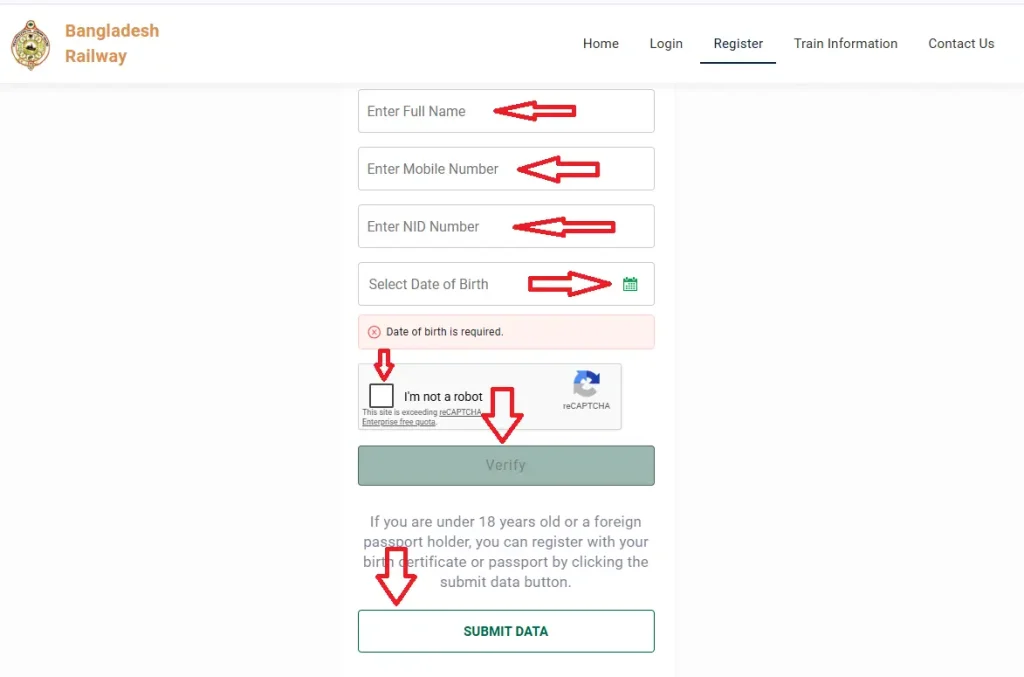
- Enter Full Name: Type your complete legal name precisely as printed on your NID. Do not use nicknames, abbreviations, or English variations if your NID shows Bangla script.
- Enter Mobile Number: Input your active Bangladeshi mobile number. This must be the same number used if you previously verified through SMS.
- Enter NID Number: Input your 10-digit Smart NID or 17-digit legacy NID number without spaces.
- Select Date of Birth: Choose your birth date from the calendar picker. Date of birth is required and must match the Election Commission database exactly.
Step 4: Verify Your NID
Click the “Verify” button. The system cross-checks your details against the Bangladesh Election Commission database in real-time.
What happens during verification:
- The portal sends an automated query to the NID database
- If matched, you proceed to SMS verification
- If mismatched, an error message appears double-check spelling and date format
Step 5: Complete SMS Verification
After NID validation, the system sends an SMS confirmation to your registered mobile number. Enter the OTP code to finalize your account activation.
NID SMS Verification Process
The SMS verification is mandatory for account activation:
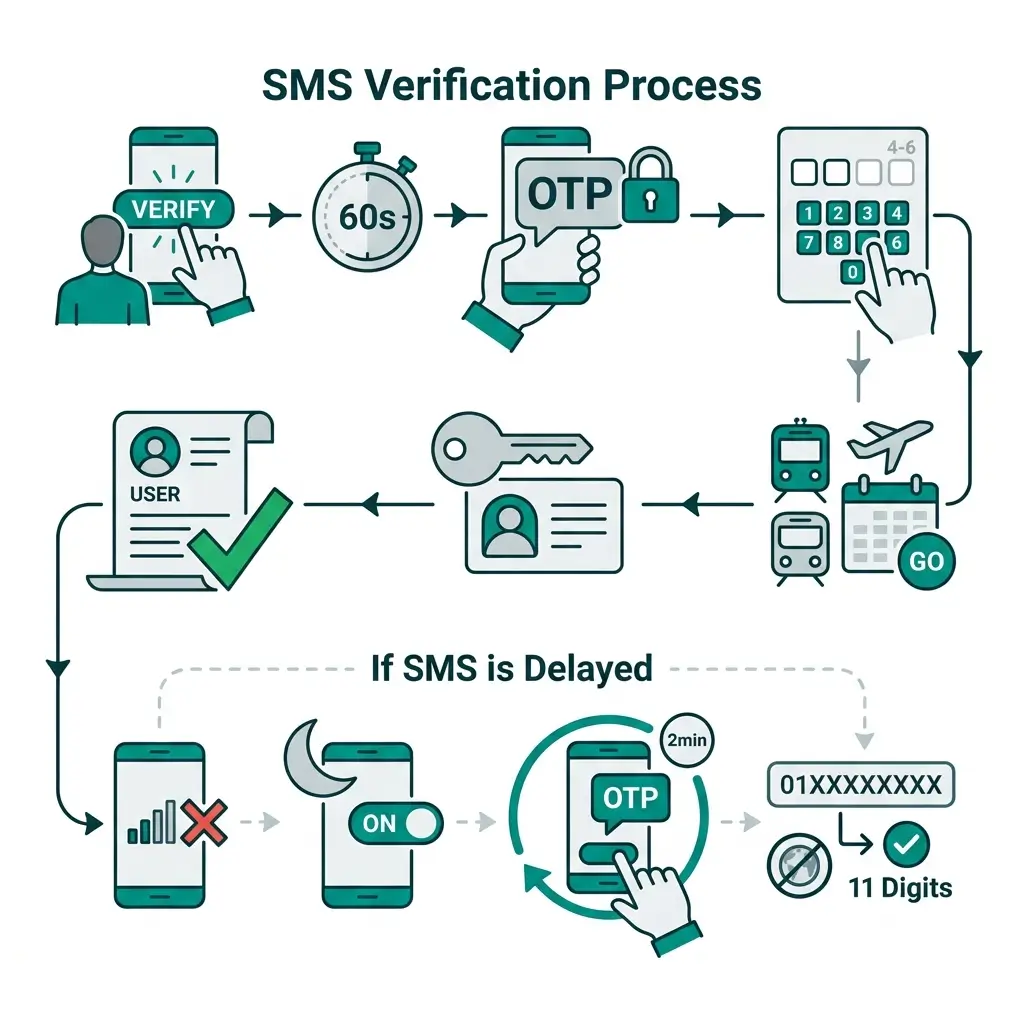
- Wait for SMS: After clicking “Verify,” check your mobile within 60 seconds
- Enter OTP: Input the 4-6 digit code in the verification field
- Account activation: Successful OTP entry completes your registration
- Start booking: Log in immediately to purchase tickets
If SMS is delayed:
- Ensure your phone has network signal
- Check if DND (Do Not Disturb) blocks automated messages
- Click “Resend OTP” after 2 minutes
- Verify your mobile number format (11 digits, no country code needed)
Alternative Registration for Minors & Foreigners
Not eligible for NID verification? Bangladesh Railway provides an alternative path:
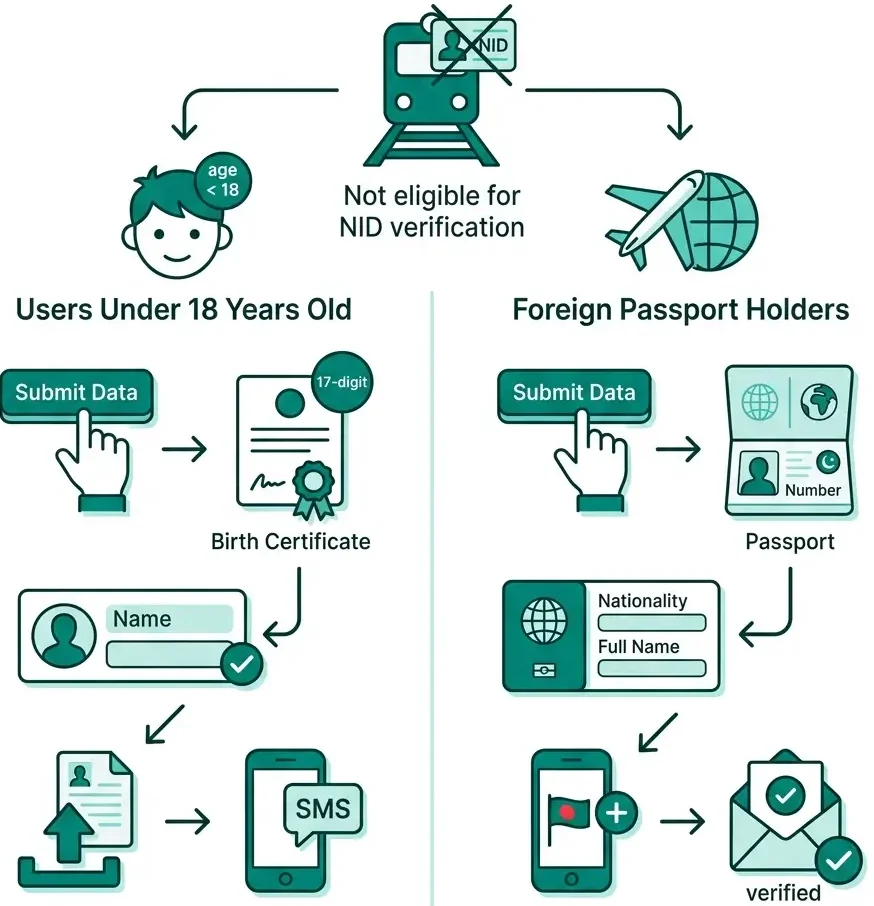
For Users Under 18 Years Old
If you are under 18 years old, you cannot use NID verification. Instead:
- Click the “Submit Data” button below the main verification form
- Select “Birth Certificate” as your ID type
- Enter your 17-digit Birth Registration Number
- Provide your full name (as on birth certificate)
- Upload a scanned copy if required
- Complete mobile verification via SMS
For Foreign Passport Holders
If you hold a foreign passport, you can register by:
- Clicking “Submit Data”
- Selecting “Passport” as your ID type
- Entering your passport number
- Providing your nationality and full legal name
- Using an international mobile number with country code (+880 for Bangladeshi SIMs recommended)
- Completing email verification (primary method for foreigners)
Note: Foreign passport holders may face additional verification delays. Contact Bangladesh Railway support at [email protected] if registration exceeds 24 hours.
Account Security Best Practices
After you register, protect your verified account:
- Enable Login Alerts The system automatically sends SMS alerts for every login. If you receive an alert for unknown access, change your password immediately.
- Use Strong Passwords After NID verification, create a password with:
- Minimum 8 characters
- Uppercase and lowercase letters
- Numbers and special symbols
- No personal information (birth dates, NID digits)
- Never Share OTPs Bangladesh Railway never asks for your SMS OTP via phone calls. Any such request is fraudulent.
- Update Mobile Number Promptly If you change your SIM, update your registered mobile immediately. You cannot recover your account without SMS access.
Benefits vs. Limitations of NID Registration
| Feature | NID-Verified Registration | Alternative (Birth Cert/Passport) |
|---|---|---|
| Booking Speed | Instant activation | 24-48 hour manual review |
| Ticket Limits | Standard passenger quota | May have restricted quotas |
| Boarding Verification | Automated NID scan | Manual document check |
| Account Recovery | SMS + NID based | Email + support ticket |
| International Use | Bangladeshi citizens only | Foreigners and minors |
| Scalping Protection | Maximum security | Standard security |
Common Registration Mistakes to Avoid
Avoid these critical errors that cause 90% of registration failures:
Mistake 1: Name Mismatch
Entering “Md. Karim” when your NID shows “Mohammad Karim” blocks verification. Copy exactly from your card.
Mistake 2: Wrong Date Format
Using MM-DD-YYYY instead of the required DD-MM-YYYY format causes database mismatch.
Mistake 3: Inactive Mobile Numbers
Using a deactivated SIM or foreign number without +880 prefix prevents SMS delivery.
Mistake 4: Spaces in NID Number
Typing “1985 1234 5678” instead of “198512345678” fails validation. Always enter continuous digits.
Mistake 5: Attempting Multiple Rapid Verifications
After 3 failed attempts, the system temporarily locks your IP for 30 minutes. Double-check details before clicking “Verify.”
FAQs About Bangladesh Railway E-Ticket Registration
Q1: Can I register without an NID?
Yes, but with limitations. If you are under 18 or a foreign passport holder, click “Submit Data” to register with your birth certificate or passport. However, this requires manual review and may take 24-48 hours for activation.
Q2: Why does my NID verification fail?
Three common causes:
- Name mismatch: Your entered name differs from the Election Commission database
- Unupdated NID: Recently issued Smart NIDs take 7-14 days to sync
- Database error: Rare server issues — retry after 1 hour
Q3: How long does SMS verification take?
Usually 30-60 seconds. If delayed beyond 5 minutes:
- Check network signal
- Disable SMS filters/DND
- Click “Resend OTP”
- Ensure your number is active and not suspended
Q4: Can I change my registered mobile number later?
Yes. Log into your account, navigate to Profile Settings, and update your mobile number. The new number requires fresh SMS verification before booking.
Q5: Is my NID data safe with Bangladesh Railway?
Yes. The portal uses encrypted NID verification through official Election Commission APIs. Your data is processed under Bangladesh’s Digital Security Act, 2018, and is not shared with third parties.
Q6: What if I am under 18 years old or a foreign passport holder?
You can register by clicking the “Submit Data” button and providing your birth certificate or passport details. This alternative path ensures all travelers can access online booking regardless of NID eligibility.
Read Also: Dhaka to Chattogram Train Ticket Price 2026
Conclusion
Register for Bangladesh Railway e-tickets using the real NID verification method to secure your seat on popular routes like Dhaka-Chittagong, Dhaka-Sylhet, and Dhaka-Rajshahi. The process takes under 5 minutes but eliminates hours of counter queues.
Simra Khan
I am Simra Khan, a travel enthusiast and digital creator. I founded this platform to simplify Bangladesh Railway travel for you. My goal is to provide clear, updated guides and booking tips, ensuring your journey across our beautiful country is stress-free.